BSS-Odoo Integration
Design Principle: Odoo handles all things commercial.
Overview
This document defines the complete integration pattern between ABS and Odoo, covering:
1. Transactional Service Events - One-time sales/swaps via sale.order
2. Subscription Billing - Recurring billing via sale.subscription
3. Payment QR Flow - QR-based payment processing
Where this workflow mentions OVApp or attendant-facing frontend behavior, that
same application surface may be the Portal App (PA) in SA-governed
deployments. PA is the SA-governed portal form of OVApp, not a separate
application.
Core Principle: Zero custom Odoo fields—semantic mapping using native Odoo models only.
Part 1: Transactional Service Events
Scope
Battery swaps, vehicle sales, accessory purchases, service activations—any point-of-sale transaction.
Core Mapping
| Component | Term | Odoo Model | ID Mapping |
|---|---|---|---|
| ABS | service_event |
- | service_event_id |
| Odoo | Order/Quotation | sale.order |
sale.order.id |
Key: service_event_id = sale.order.id
State Lifecycle
| ABS Event State | Odoo State (sale.order.state) |
Description |
|---|---|---|
open |
draft or sent |
Service in progress; awaiting payment |
paid |
sale |
Payment confirmed via MoMo validation |
cancelled |
cancel |
Event terminated or abandoned |
Odoo persists orders from creation, enabling session resume after disruptions.
Why sale.order as Service Event
Pre-Payment Persistence: - Order exists before payment - Supports customer negotiation, device crashes, network disruptions, MoMo delays
Mixed Line Items: - Goods: Motorcycle, accessories, spare parts - Services: Subscription activation, swap fee, energy fee, penalties - Bundles: Vehicle + subscription + accessories
Architecture Benefits: - Native Odoo workflows—no custom sales logic - Scalable for multi-line transactions - Standard financial reporting
Payment Validation Flow
- Order Creation: ABS initiates
service_event→ Odoo createssale.orderasdraft - Customer Payment: Customer pays via MoMo to company collection account
- Transaction Capture: Rep enters MoMo transaction ID in ABS
- Validation Request: ABS calls Odoo
ValidatePaymentAPI - Payload:
{service_event_id, payment_tx_id, expected_amount} - Payment Matching: Odoo searches MoMo records by
transaction_id+amount - On match → sets
sale.order.state = sale - Event Confirmation: Odoo returns
{paid: true, order_id, payment_date}
Responsibility Matrix
| Capability | ABS | Odoo |
|---|---|---|
| Event Initiation | Initiates service session, collects data | Creates sale.order in draft |
| Order Persistence | Holds service_event_id reference |
Persists sale.order across disruptions |
| Payment Validation | Sends validation request | Matches payment records; confirms order state |
| Service Continuation | Proceeds only after confirmation | Provides definitive paid/unpaid status |
| Financial Reporting | No accounting responsibilities | Full reporting, inventory, pricing, taxes |
Part 2: Subscription Billing
Scope
Monthly/periodic subscription billing, recurring invoices, payment synchronization.
Workflow Diagram
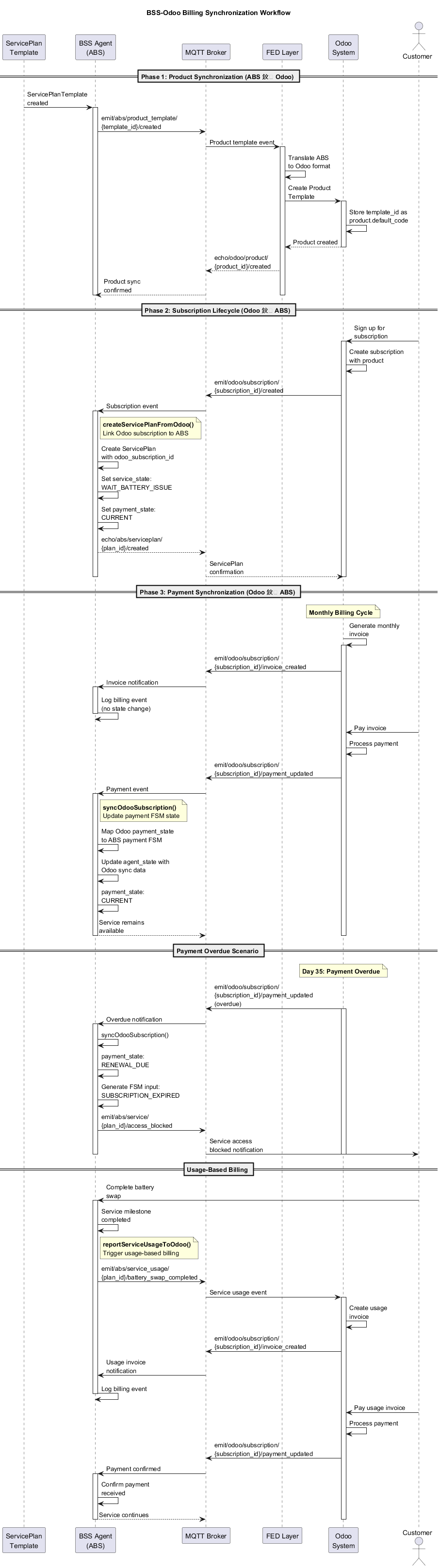
Three billing synchronization phases: Product Synchronization (ABS → Odoo), Subscription Lifecycle (Odoo → ABS), Payment Synchronization (bidirectional).
Entity Relationship
- ABS ServicePlanTemplate ≡ Odoo Product Template (catalog level)
- ABS ServicePlan ≡ Odoo Subscription (customer instance level)
Three-Phase Integration
Phase 1: Product Synchronization (ABS → Odoo)
ABS ServicePlanTemplate Created
  ↓ MQTT: emit/abs/product_template/{template_id}/created
    ↓ FED Layer Translation
      ↓ Odoo: Create Product Template
        ↓ Store: template_id as product.default_code
Semantic Field Mappings:
- template_id → product.template.default_code (linking)
- name → product.template.name
- description → product.template.description_sale
- billing_currency → product.template.currency_id
- status → product.template.active
- CommonTerms.monthly_fee → product.list_price
- CommonTerms.billing_cycle → recurring_rule_type
Product Naming: [service]-[duration]-[location] (e.g., BSS-Monthly-Nairobi)
Phase 2: Subscription Lifecycle (Odoo → ABS)
Odoo Subscription Created
  ↓ MQTT: emit/odoo/subscription/{subscription_id}/created
    ↓ ABS MQTT Listener
      ↓ BSS Agent: createServicePlanFromOdoo()
        ↓ ServicePlan created with odoo_subscription_id link
ServicePlan Creation:
const servicePlan = {
  customer_id: payload.partner_id,
  template_id: payload.template_id,
  plan_state: {
    status: 'ACTIVE',
    agent_state: {
      odoo_subscription_id: payload.subscription_id,
      odoo_subscription_state: payload.state,
      odoo_last_sync_at: timestamp
    }
  },
  service_state: 'WAIT_BATTERY_ISSUE',
  payment_state: 'CURRENT'
};
Phase 3: Payment Synchronization (Odoo → ABS)
Odoo Payment Event
  ↓ MQTT: emit/odoo/subscription/{subscription_id}/payment_updated
    ↓ ABS MQTT Listener
      ↓ BSS Agent: syncOdooSubscription()
        ↓ Update payment_state FSM
State Mappings:
Subscription States:
| Odoo State | ABS Service State | Description |
|------------|------------------|-------------|
| draft | SERVICE_INITIAL | Not started |
| in_progress | SERVICE_ACTIVE | Active |
| to_renew | SERVICE_RENEWAL_DUE | Renewal period |
| closed | SERVICE_CLOSED | Ended |
| cancel | SERVICE_CANCELLED | Cancelled |
Payment States:
| Odoo Payment State | ABS Payment FSM | FSM Input |
|-------------------|-----------------|-----------|
| not_paid | RENEWAL_DUE | SUBSCRIPTION_EXPIRED |
| in_payment | PAYMENT_PROCESSING | (monitoring) |
| paid | CURRENT | RENEWAL_PAID |
| partial | RENEWAL_DUE | (grace period) |
| reversed | PAYMENT_REVERSED | PAYMENT_ERROR |
| cancel | PAYMENT_CANCELLED | SUBSCRIPTION_EXPIRED |
BSS Agent Integration Methods
1. syncOdooSubscription()
- Purpose: Sync ABS payment-cycle FSM with Odoo billing events
- Input: {subscription_id, payment_state, subscription_state, invoice_id}
- Output: Updated agent_state, FSM inputs generated
2. checkOdooPaymentStatus()
- Purpose: Query current payment status for service availability
- Returns: Payment validation signals
3. reportServiceUsageToOdoo()
- Purpose: Report service milestones to trigger usage-based billing
- Events: Battery swap completion, quota exhaustion, service termination
Zero Custom Fields Approach
Linking Mechanism:
- Product Level: ABS template_id → Odoo product.default_code
- Subscription Level: Odoo subscription.id → ABS agent_state.odoo_subscription_id
- No Custom Odoo Fields: Zero Odoo data model modifications
BSSAgentState Structure:
interface BSSAgentState {
  // Existing BSS fields
  agent_version: string;
  swaps_today: number;
  execution_count: number;

  // Odoo integration (domain isolation)
  odoo_subscription_id: number | null;
  odoo_last_sync_at: string | null;
  odoo_payment_state: string | null;
  odoo_subscription_state: string | null;
  odoo_payment_method: string | null;
  odoo_currency_id: string | null;
}
Benefits: - No schema pollution—core ServicePlan unchanged - Agent-specific—only BSS agent handles Odoo - Domain isolation—Odoo concepts confined to BSS domain
Part 3: Payment QR Flow
Scope
QR-based payment processing for quota top-ups during battery swaps.
Key Principle: ABS is the source of truth for service/payment event history. Odoo consumes events for CRM enrichment.
QR Code Structure
When quota is exhausted, attendant app displays QR code containing Service Event + Payment Event data.
QR Code JSON Payload:
{
  "qr_type": "abs_payment_request",
  "version": "1.0",

  "service_event": {
    "event_id": "SE-12345",
    "event_type": "BATTERY_SWAP",
    "timestamp": "2025-01-15T10:25:00Z",
    "plan_id": "bss-plan-weekly-freedom-nairobi-v2-plan1",
    "customer_id": "CUST-001",
    "attendant_id": "ATT-001",
    "station_id": "STATION_XYZ",
    "batteries": {
      "returned": {"id": "BAT-12345", "kwh": 4.8},
      "issued": {"id": "BAT-67890", "kwh": 30.4},
      "net_kwh_delivered": 25.6
    },
    "quota_consumption": {
      "swap_count": 1,
      "electricity_kwh": 25.6
    }
  },

  "payment_event": {
    "event_id": "PE-78910",
    "event_type": "TOPUP_PAYMENT",
    "timestamp": "2025-01-15T10:25:00Z",
    "amount": 15.00,
    "currency": "USD",
    "merchant_station": "STATION_XYZ",
    "service_description": "Battery Swap + Electricity Top-up",
    "quota_deficit_kwh": 15.6,
    "linked_service_event_id": "SE-12345"
  },

  "abs_metadata": {
    "abs_version": "2.0.0",
    "correlation_id": "TXN-12345",
    "callback_url": "mqtt://abs-platform/payment/confirm/TXN-12345"
  }
}
Payment Workflow
Attendant scans outgoing battery
  ↓ ABS calculates quota (remaining < net)
    ↓ ABS generates Service Event + Payment Event
      ↓ Attendant app displays QR code
        ↓ Rider scans QR with rider app
          ↓ Odoo opens payment page (pre-filled)
            ↓ Rider completes payment
              ↓ Odoo updates CRM from events
                ↓ Odoo sends payment confirmation (MQTT)
                  ↓ ABS notifies attendant app
                    ↓ Attendant hands battery to rider
                      ↓ ABS persists events to database
                        ↓ ABS updates quotas & FSM states
Event Persistence
ABS Database (Conceptual):
-- Service Events
CREATE TABLE service_events (
  event_id VARCHAR PRIMARY KEY,
  event_type VARCHAR NOT NULL,
  timestamp TIMESTAMP NOT NULL,
  plan_id VARCHAR NOT NULL,
  customer_id VARCHAR NOT NULL,
  attendant_id VARCHAR,
  station_id VARCHAR,
  battery_returned_id VARCHAR,
  battery_issued_id VARCHAR,
  net_kwh_delivered DECIMAL(10,1),
  swap_count_consumed INT,
  electricity_kwh_consumed DECIMAL(10,1)
);

-- Payment Events
CREATE TABLE payment_events (
  event_id VARCHAR PRIMARY KEY,
  event_type VARCHAR NOT NULL,
  timestamp TIMESTAMP NOT NULL,
  plan_id VARCHAR NOT NULL,
  amount DECIMAL(10,2),
  currency VARCHAR(3),
  merchant_station VARCHAR,
  quota_deficit_kwh DECIMAL(10,1),
  linked_service_event_id VARCHAR REFERENCES service_events(event_id),
  odoo_receipt_id VARCHAR
);
Data Ownership
| Data Type | Owner | Consumer | Purpose |
|---|---|---|---|
| Service Events | ABS | Odoo | Service history, customer transparency |
| Payment Events | ABS | Odoo | Payment history, reconciliation |
| Payment Processing | Odoo | ABS | Payment confirmation, receipt ID |
| Customer CRM | Odoo | ABS | Customer details, subscription status |
| ServicePlan State | ABS | Odoo | Quota status, service availability |
Payment Confirmation (MQTT)
Topic: mqtt://abs-platform/payment/confirm/{correlation_id}
Payload:
{
  "correlation_id": "TXN-12345",
  "payment_event_id": "PE-78910",
  "odoo_receipt_id": "PAY-78910",
  "payment_status": "SUCCESS",
  "payment_method": "MOBILE_MONEY",
  "payment_timestamp": "2025-01-15T10:24:30Z"
}
Error Handling
Payment Timeout: - Attendant app displays "Payment Timeout" - Can retry with new QR or cancel service - Events not persisted until payment confirmed
Payment Failure: - Odoo sends failure notification to ABS - Attendant app displays "Payment Declined - Retry?" - Events not persisted until successful payment
Duplicate Payment:
- ABS checks correlation_id + payment_event_id uniqueness
- Duplicate flagged for refund in Odoo CRM
- Only one Payment Event persisted per Service Event
MQTT Topic Patterns
ABS → Odoo (Service Events)
emit/abs/product_template/{template_id}/createdemit/abs/service_usage/{plan_id}/battery_swap_completedemit/abs/service_usage/{plan_id}/service_terminated
Odoo → ABS (Billing Events)
emit/odoo/subscription/{subscription_id}/createdemit/odoo/subscription/{subscription_id}/payment_updatedemit/odoo/subscription/{subscription_id}/state_changedemit/odoo/subscription/{subscription_id}/invoice_created
Payment Confirmations (Bidirectional)
mqtt://abs-platform/payment/confirm/{correlation_id}(Odoo → ABS)
Integration Benefits
No Odoo Customization
- Zero custom fields added to Odoo models
- Standard Odoo workflow preserved
- Upgrade compatibility maintained
- Minimal configuration required
Clean Architecture
- ABS leads product definition—business logic ownership
- Odoo leads customer relationships—CRM ownership
- MQTT-based synchronization—real-time updates
- Semantic field mapping—no data structure changes
Domain Isolation
- Core ServicePlan: Completely unchanged
- BSS agent_state: Contains all Odoo integration data
- Other agents: Unaffected by Odoo integration
- Schema purity: No Odoo concepts leak into core ABS
Implementation Benefits
- Low risk: No Odoo data model changes
- High reuse: Leverages 95% existing ABS architecture
- Scalable: Standard MQTT patterns for future integrations
- Event-driven: Async processing supports resilient operations
Cost Analysis
ABS Changes Required
- ServicePlan schema: ZERO changes (agent_state JSON already supports)
- BSS Agent: +3 methods (syncOdooSubscription, checkOdooPaymentStatus, reportServiceUsageToOdoo)
- BSSAgentState: +6 fields within existing agent_state JSON
- Core Platform: Completely unchanged
Odoo Changes Required
- Zero data model changes
- MQTT publishing for subscription/payment events (standard)
- Product template creation via API (standard)
- QR code scanning for payment initiation (standard)
Integration Effort
- Phase 1: Product template sync (low complexity)
- Phase 2: Subscription creation sync (medium complexity)
- Phase 3: Payment synchronization (medium complexity)
- Phase 4: QR payment flow (medium complexity)
- Total: 4 phases, incremental deployment possible
Related Documentation
- Integration Tests:
bss-odoo-integration-tests.md - Odoo Schema Reference:
odoo-subscription-schema.json
Summary
Transactional Events:  service_event ≡ sale.order
Subscription Billing:  ServicePlan ≡ sale.subscription
Payment QR Flow:       ABS source of truth, Odoo consumes events

ABS:   Service orchestration, event persistence
Odoo:  Commercial transactions, payment processing, CRM
Full Odoo-ABS integration achieved with absolute minimal changes to both systems while maintaining clean architectural boundaries and leveraging existing infrastructure.